TextBox
A text box that holds text with customizable size, font style, margins, and rotation.
You can define margins (padding around the text), and enable auto_fit to automatically resize the box based on the text’s length.
If auto_fit is set to True, the width and height of the text box will be adjusted to accommodate the text content.
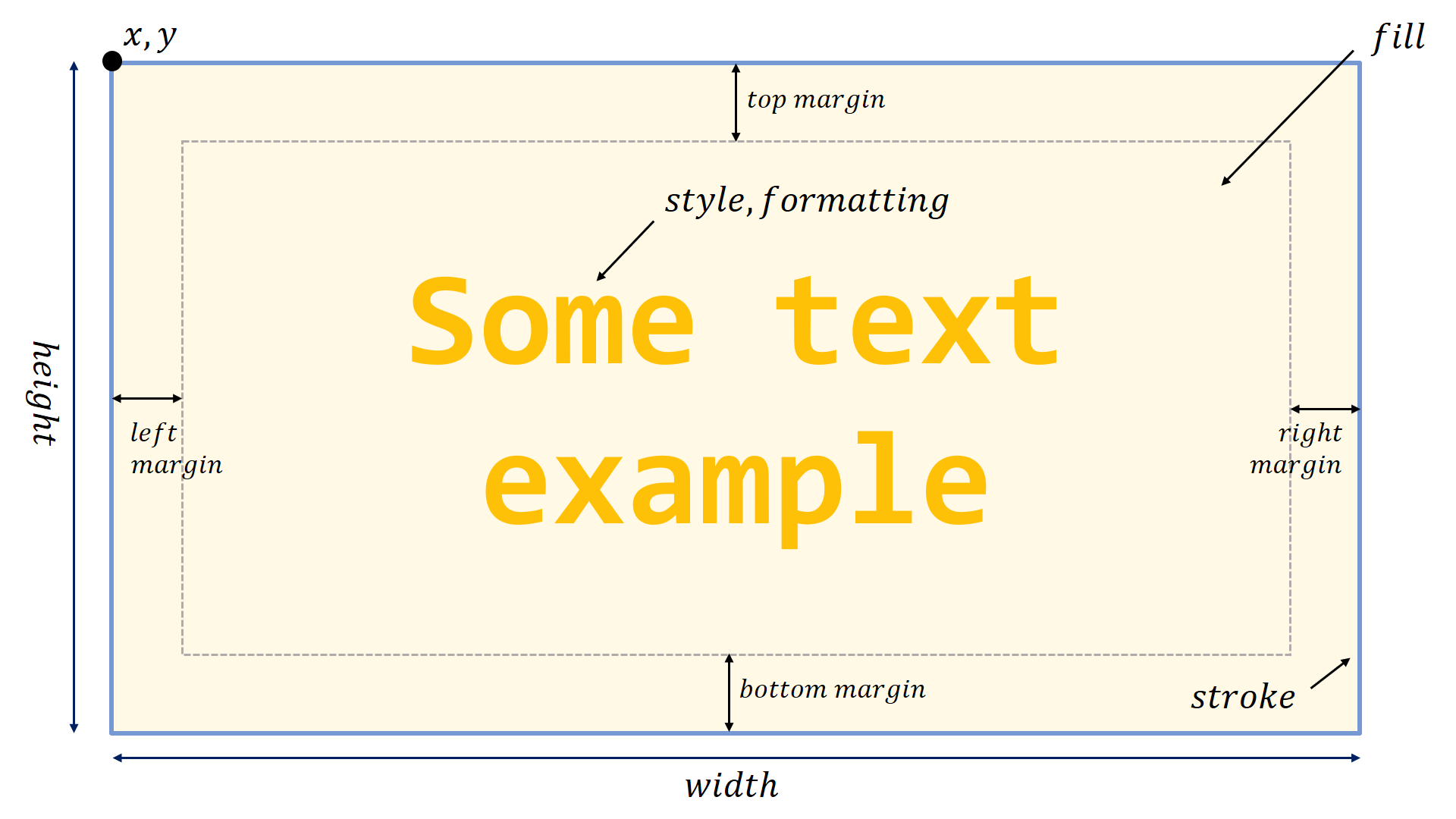
- class pptx_shapes.shapes.TextBox(x: float, y: float, width: float, height: float, text: str, style: pptx_shapes.style.font_style.FontStyle = FontStyle(size=14, color='#000000', family='Calibri', align=<Align.CENTER: 'ctr'>, vertical_align=<VerticalAlign.CENTER: 'ctr'>), formatting: pptx_shapes.style.font_format.FontFormat = FontFormat(bold=False, italic=False, underline=False, strike=False), margin: pptx_shapes.style.margin.Margin = Margin(left=0, right=0, top=0, bottom=0), auto_fit: bool = False, angle: float = 0, fill: Optional[pptx_shapes.style.fill_style.FillStyle] = None, stroke: Optional[pptx_shapes.style.stroke_style.StrokeStyle] = None)
Parameters
x(float) – left position (in centimeters).y(float) – top position (in centimeters).width(float) – width (in centimeters).height(float) – height (in centimeters).angle(float, optional) – rotation in degrees, default is0.auto_fit(bool, optional) – boolean that, when set to True, automatically adjusts the size of the text box to fit its, default isFalse.style(FontStyle, optional) – style of the font (font size, color, family, etc.).formatting(FontFormat, optional) – formatting of the content (bold, italic, underline, …).margin(Margin, optional) – (left, top, right, bottom) margins that define the inner spacing, default isMargin(0, 0, 0, 0).fill(FillStyle, optional) – fill style.stroke(StrokeStyle, optional) – stroke style.
Example
from pptx_shapes.shapes import TextBox
from pptx_shapes.style import FontStyle, FontFormat, FillStyle, strokeStyle

textbox = TextBox(
    x=17, y=8,
    width=15, height=3,
    text="Two lines of\nitalic vertical text",
    angle=90,
    style=FontStyle(size=35, family="Arial", align=Align.LEFT),
    formatting=FontFormat(italic=True),
    fill=FillStyle(color="#ddd"),
    stroke=StrokeStyle(color="#222", dash=LineDash.DASHED)
)